

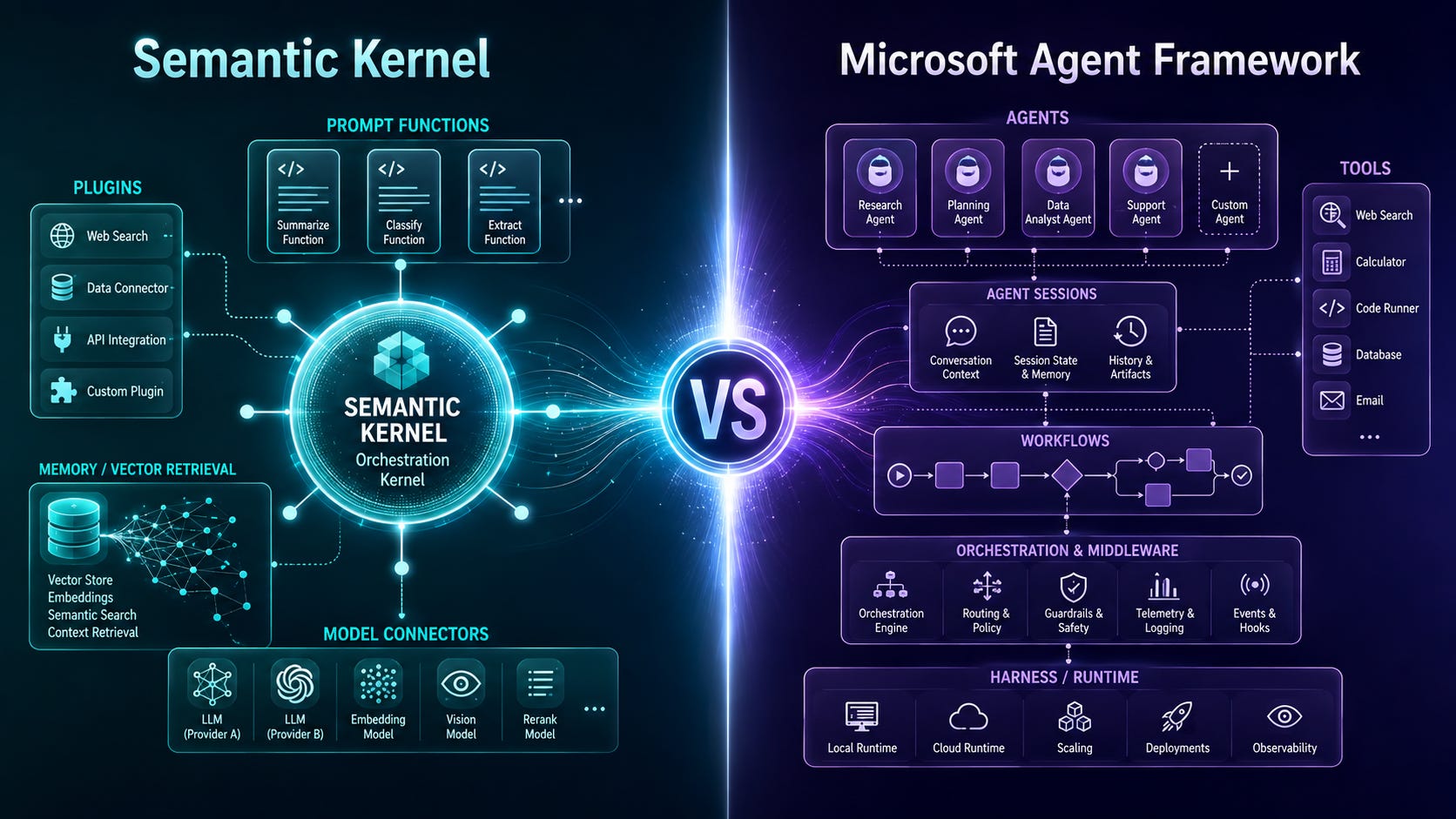
If you are a .NET-focused software engineer and you build or maintain agentic AI systems written in .NET, then chances are that you have come across Semantic Kernel and the Microsoft Agent Framework.
So, you may be asking, what’s the difference between the two, and which one should you use? Or, if you are on Semantic Kernel, how would you migrate to the Microsoft Agent Framework?
Today, we will answer all of these questions.
One caveat before we go. This article assumes that you are already familiar with the basic C# syntax, or, at least, have experience in other programming languages, so you can infer it. While I will explain the samples, I won’t be explaining every line. The important details will be explained by comments in the code.
So, let’s begin!
Are they both still relevant?
Well, the answer to this question is both yes and no.
Microsoft Agent Framework is the strategic successor to both Semantic Kernel’s agent framework and AutoGen. Microsoft Agent Framework reached version 1.0 in April 2026. So, any new developments where no agentic AI functionality exists yet should be done with the Microsoft Agent Framework.
That does not make Semantic Kernel irrelevant. It remains useful for existing applications, Java development, prompt templating, kernel-based plugin composition, and its vector-store integrations. For new .NET or Python agentic applications, however, Microsoft Agent Framework is a much better starting point.
Think of Semantic Kernel as a “maintenance-only” framework, just like the original Windows-only .NET Framework.
The essential difference
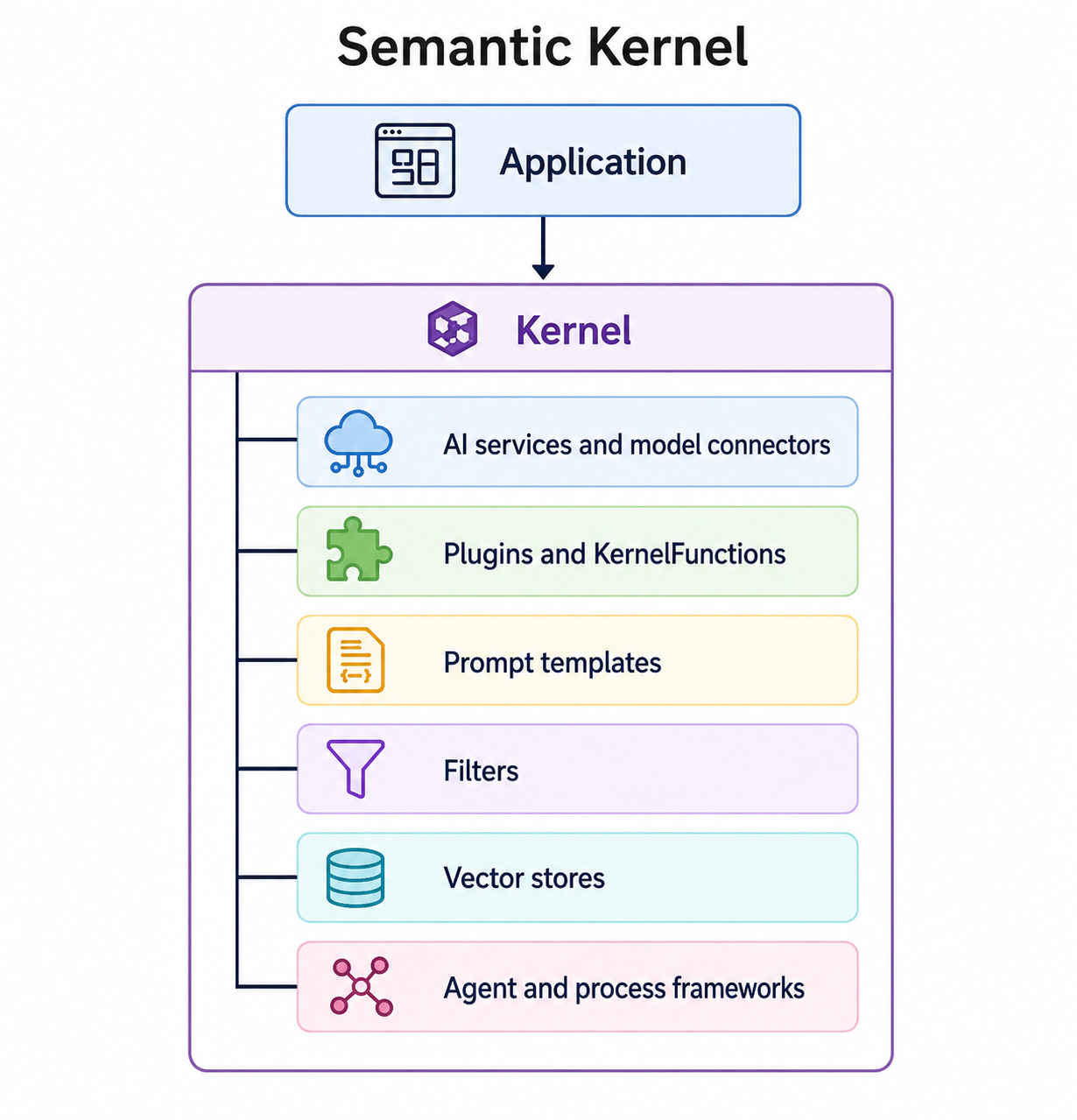
The structure of Semantic Kernel can be summarized as this:
Microsoft Agent Framework, on the other hand, is structured like this:
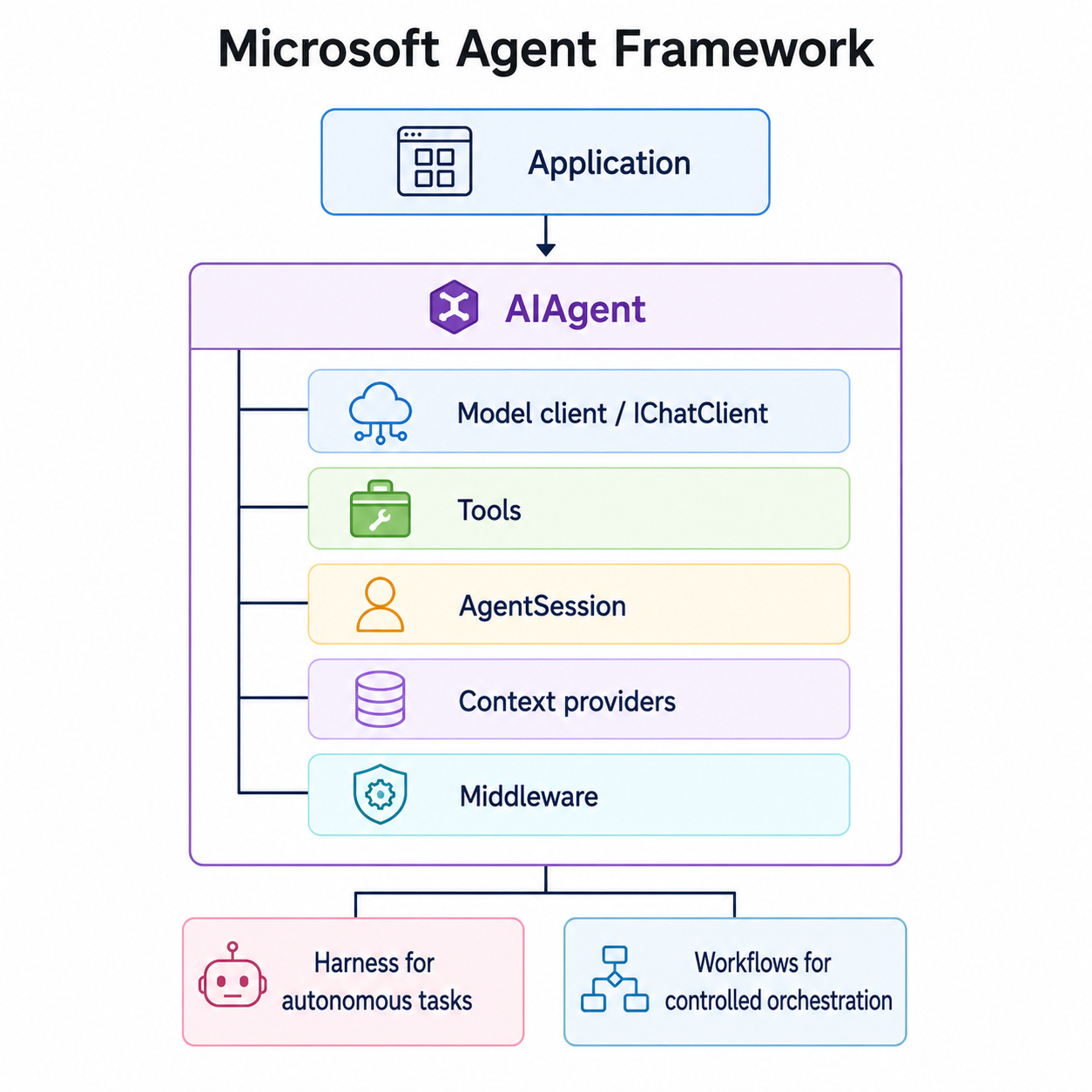
Semantic Kernel centres everything around a dependency-injection container called the Kernel. Microsoft Agent Framework centres its programming model around the provider-neutral AIAgent abstraction and the Microsoft.Extensions.AI message, tool, and client types.
Let’s now cover each framework in more detail.
Semantic Kernel
The Kernel
The Kernel is Semantic Kernel’s central service container. It contains:
Model and embedding services.
Plugins.
Logging and other dependency-injected services.
Filters.
Configuration used by prompts and agents.
When a prompt is invoked, the Kernel selects an AI service, renders the prompt, sends it to the model, processes the result and returns it to the caller. Because all operations pass through the Kernel, it provides a common place for configuration, telemetry, and policy enforcement.
This is how Kernel is initialized with OpenAI chat completion dependencies:
// Use teh Semantic Kernel nmespace
using Microsoft.SemanticKernel;

// Create a new instance of Kernel builder
var builder = Kernel.CreateBuilder();

// Create a chat completion service and connect it
builder.AddAzureOpenAIChatCompletion(
    deploymentName: Environment.GetEnvironmentVariable(
        "AZURE_OPENAI_DEPLOYMENT_NAME")!,
    endpoint: Environment.GetEnvironmentVariable(
        "AZURE_OPENAI_ENDPOINT")!,
    apiKey: Environment.GetEnvironmentVariable(
        "AZURE_OPENAI_API_KEY")!);

// Build the Kernel object
Kernel kernel = builder.Build();
The Kernel can contain multiple keyed AI services, allowing application code to select different models for different operations. For example, a smaller model might classify a request while a more capable model generates the final response.
Model connectors
Semantic Kernel provides abstractions and connectors for:
Chat-completion models.
Text-generation models.
Embedding models.
Image and audio-capable models.
Azure OpenAI and OpenAI.
Local and third-party providers such as Ollama.
The application normally consumes Semantic Kernel abstractions such as IChatCompletionService rather than working directly with a provider SDK, as the following example demonstrates:
using Microsoft.Extensions.DependencyInjection;
using Microsoft.SemanticKernel.ChatCompletion;

// Create an instance of a chat servie from the Kernel
IChatCompletionService chatService =
    kernel.GetRequiredService<IChatCompletionService>();

// Create a new chat history
ChatHistory history = new(
    "You are a concise technical assistant.");

// Add a message to the chat history on behalf of the user
history.AddUserMessage(
    "Explain the purpose of dependency injection.");

// Pass the chat history into the chat completion service and get a response
ChatMessageContent response =
    await chatService.GetChatMessageContentAsync(history);

Console.WriteLine(response.Content);
Prompt functions and templates
A prompt can be turned into a callable KernelFunction. This makes prompts resemble normal application functions: they have arguments, execution settings, and a return value.
Semantic Kernel’s native template syntax supports variables and function calls. Here’s what it looks like:
// Create a Kernel function from a system prompt with template that acceps input vlues
KernelFunction summarise = kernel.CreateFunctionFromPrompt(
    """
    Summarise the following text in three bullet points.

    {{$input}}
    """);

// Invoke the function from Kernel
FunctionResult result = await kernel.InvokeAsync(
    summarise,
    new KernelArguments
    {
        ["input"] =
            "Semantic Kernel connects AI models to application code..."
    });

Console.WriteLine(result);
Prompt functions are useful when you want to treat AI operations as application-level components rather than constructing raw messages manually.
Plugins
A plugin is a named group of functions exposed to the model. Plugins can be created from:
Native C# or Python code.
Prompt functions.
OpenAPI specifications.
MCP servers.
Semantic Kernel uses the function metadata to create a schema that the model can understand. It then manages the model–tool loop: send available functions, receive a tool request, invoke the function and return the result to the model.
Here’s a complete example that uses a plugin and automatic function calling:
using System.ComponentModel;
using Microsoft.Extensions.DependencyInjection;
using Microsoft.SemanticKernel;
using Microsoft.SemanticKernel.ChatCompletion;
using Microsoft.SemanticKernel.Connectors.OpenAI;

// Extract a model deployment name from environment variables
string deploymentName =
    Environment.GetEnvironmentVariable(
        "AZURE_OPENAI_DEPLOYMENT_NAME")
    ?? throw new InvalidOperationException(
        "AZURE_OPENAI_DEPLOYMENT_NAME is missing.");

// Extract the model endpoint
string endpoint =
    Environment.GetEnvironmentVariable("AZURE_OPENAI_ENDPOINT")
    ?? throw new InvalidOperationException(
        "AZURE_OPENAI_ENDPOINT is missing.");

// Extract the model API key
string apiKey =
    Environment.GetEnvironmentVariable("AZURE_OPENAI_API_KEY")
    ?? throw new InvalidOperationException(
        "AZURE_OPENAI_API_KEY is missing.");

var builder = Kernel.CreateBuilder();

builder.AddAzureOpenAIChatCompletion(
    deploymentName: deploymentName,
    endpoint: endpoint,
    apiKey: apiKey);

// Register all [KernelFunction] methods on OrderPlugin.
builder.Plugins.AddFromType<OrderPlugin>("Orders");

Kernel kernel = builder.Build();

IChatCompletionService chat =
    kernel.GetRequiredService<IChatCompletionService>();

ChatHistory history = new(
    """
    You are an order-support assistant.
    Use the available functions whenever order data is needed.
    Never invent an order status.
    """);

history.AddUserMessage(
    "Where is order ORD-1042?");

// Apply prompt execution settings for OpenAI models
var executionSettings = new OpenAIPromptExecutionSettings
{
    // Semantic Kernel automatically executes requested functions.
    FunctionChoiceBehavior = FunctionChoiceBehavior.Auto()
};

ChatMessageContent answer =
    await chat.GetChatMessageContentAsync(
        history,
        executionSettings,
        kernel);

Console.WriteLine(answer.Content);

// Create a Kernel plugin
public sealed class OrderPlugin
{
    // Add a function to the plugin with a name and description
    [KernelFunction("get_order_status")]
    [Description(
        "Gets the current delivery status of an order.")]
    public OrderStatus GetOrderStatus(
        [Description("The order identifier, such as ORD-1042.")]
        string orderId)
    {
        // Replace this with a database or API call.
        return new OrderStatus(
            orderId,
            Status: "In transit",
            EstimatedDelivery: DateOnly.FromDateTime(
                DateTime.UtcNow.AddDays(2)));
    }
}

public sealed record OrderStatus(
    string OrderId,
    string Status,
    DateOnly EstimatedDelivery);
The descriptions are important. The model uses them to decide:
Whether the function is relevant.
Which arguments it should supply.
What the function result represents.
Tool descriptions should therefore be specific, unambiguous and explicit about side effects.
Planning through function calling
Older Semantic Kernel versions contained dedicated planner implementations. The modern approach is usually to expose well-described functions and allow the model to construct a plan through native function calling.
For example, a travel assistant might call:
search_flightscheck_policycalculate_totalcreate_booking
The plan does not need to be explicitly represented as a separate object. It emerges from the model’s sequence of function calls.
This is suitable for flexible tasks, but it does not guarantee that functions execute in a particular order. A deterministic business process should generally use a workflow rather than relying entirely on model planning.
Chat history and agents
Semantic Kernel supports ordinary chat histories as well as higher-level agent abstractions. Its agent framework includes agent types such as ChatCompletionAgent and supports multi-agent orchestration patterns.
This example demonstrates how an agent generates chat history:
using Microsoft.SemanticKernel.Agents;

// Create a new chat completion agent
ChatCompletionAgent agent = new()
{
    Name = "ArchitectureAdvisor",
    Instructions =
        """
        You review proposed software architectures.
        Identify reliability risks and recommend concrete changes.
        """,
    Kernel = kernel
};

await foreach (
    AgentResponseItem<ChatMessageContent> response
    in agent.InvokeAsync(
        "Review an API that stores all session state in process memory."))
{
    Console.WriteLine(response.Message.Content);
}
Semantic Kernel has supported several agent-specific thread types. One simplification introduced by Microsoft Agent Framework is replacing those provider-specific thread abstractions with AgentSession.
Vector stores and RAG
Semantic Kernel provides a vector-store abstraction that standardises:
Collection creation.
Record upserts and retrieval.
Vector search.
Metadata filtering.
Mapping between application records and vector-store records.
Connectors have been available for systems such as Azure AI Search, Elasticsearch, Redis, Qdrant and other vector databases.
A typical RAG flow is this:
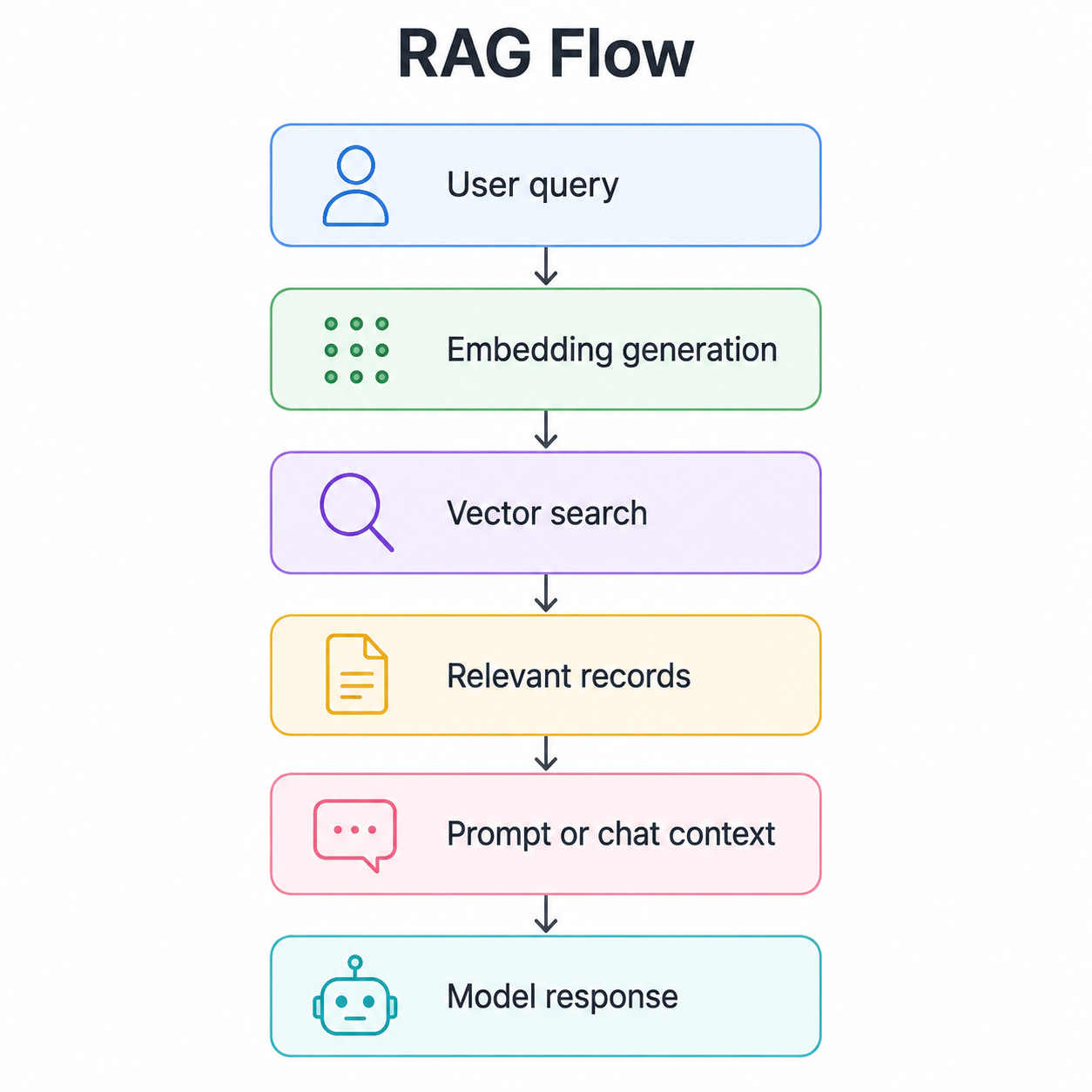
Semantic Kernel does not remove the need to design retrieval properly. You must still decide:
Chunk size and overlap.
Embedding model.
Metadata strategy.
Tenant isolation.
Hybrid keyword/vector search.
Reranking.
Source citation.
Retrieval evaluation.
Filters
Filters intercept Kernel operations and implement cross-cutting behaviour without mixing it into plugins or prompts.
Semantic Kernel has three principal filter types:
Function invocation filters intercept every
KernelFunction.Prompt-render filters inspect or modify a rendered prompt.
Automatic-function-invocation filters intercept the model-driven tool loop.
They can implement logging, authorisation, caching, redaction, retries, result transformation and early termination. Here’s an example:
using Microsoft.SemanticKernel;

// A class that implements the function invocation filter interface
public sealed class ToolAuditFilter(
    ILogger<ToolAuditFilter> logger)
    : IFunctionInvocationFilter
{
    // A method that runs when a function is invoked to log its ditails
    public async Task OnFunctionInvocationAsync(
        FunctionInvocationContext context,
        Func<FunctionInvocationContext, Task> next)
    {
        logger.LogInformation(
            "Calling {Plugin}.{Function}",
            context.Function.PluginName,
            context.Function.Name);

        try
        {
            await next(context);

            logger.LogInformation(
                "Completed {Plugin}.{Function}",
                context.Function.PluginName,
                context.Function.Name);
        }
        catch (Exception exception)
        {
            logger.LogError(
                exception,
                "Failed {Plugin}.{Function}",
                context.Function.PluginName,
                context.Function.Name);

            throw;
        }
    }
}
Register it before building the Kernel:
builder.Services.AddSingleton<
    IFunctionInvocationFilter,
    ToolAuditFilter>();
Filters are particularly important for functions with side effects. A plugin that sends an email, issues a refund or changes a database record should not be treated in the same way as a read-only retrieval function.
Process Framework
Semantic Kernel’s Process Framework models deterministic, event-driven business processes consisting of reusable steps. It supports sequential flows, fan-out/fan-in, map-reduce patterns, stateful steps and human interaction.
However, the Process Framework remains experimental. Microsoft Agent Framework Workflows are now the more strategic option for new agent orchestration.
A simplified Semantic Kernel process looks like this:
// Process definitions
ProcessBuilder process = new("DocumentPublication");

// Adding process steps
var draft =
    process.AddStepFromType<CreateDraftStep>();

var review =
    process.AddStepFromType<ReviewDraftStep>();

var publish =
    process.AddStepFromType<PublishDocumentStep>();

// Connecting process steps into a graph
process
    .OnInputEvent("Start")
    .SendEventTo(new(draft));

draft
    .OnFunctionResult()
    .SendEventTo(new(review));

review
    .OnFunctionResult()
    .SendEventTo(new(publish));

// Building the executable process
KernelProcess builtProcess = process.Build();

// Starting the process
await builtProcess.StartAsync(
    kernel,
    new KernelProcessEvent
    {
        Id = "Start",
        Data = "Write a reliability guide"
    });
Observability
Semantic Kernel emits OpenTelemetry-compatible logs, metrics and distributed traces. It records Kernel function execution and AI-model calls, including execution duration and, where supported, token-usage metrics. Prompts and completions are treated as sensitive and are not emitted unless sensitive diagnostics are explicitly enabled.
The most useful production signals normally include:
Model-call duration.
Input and output tokens.
Function-call count.
Function failures.
End-to-end request duration.
Model and deployment name.
User, tenant and correlation identifiers.
Retrieval latency and retrieved document IDs.
Human-approval events.
Agent-loop iteration count.
This covers the basics. Of course, there’s much more to it. But the basics are enough to compare it against the Microsoft Agent Framework, which we will do next.
Microsoft Agent Framework
Microsoft Agent Framework has three major capability groups:
Agents for dynamic, model-directed tasks.
Harness for long-running autonomous tasks.
Workflows for explicitly controlled business processes.
The framework also supplies sessions, context providers, middleware, MCP clients, hosting adapters and common provider-neutral abstractions.
AIAgent: the unified agent abstraction
AIAgent is the common interface presented to application code. Provider-specific clients are adapted into an agent through extension methods such as AsAIAgent.
Supported provider families include:
Microsoft Foundry.
Azure OpenAI.
OpenAI.
Anthropic.
Ollama and local models.
Remote A2A-compatible agents.
This reduces provider-specific agent classes. The same application code can generally use RunAsync, RunStreamingAsync and CreateSessionAsync regardless of how the agent is implemented.
Responses versus Chat Completions
For Azure OpenAI, Agent Framework supports both:
Responses API, recommended for new full-featured agents.
Chat Completions API, useful for broader model compatibility and existing integrations.
The Responses API supports the richer hosted-tool surface, including code interpreter, file search, web search and hosted MCP. Chat Completions is simpler and broadly compatible but does not support every hosted tool.
Tools
Tools are functions or external capabilities available to an agent. Unlike Semantic Kernel, Agent Framework does not require a Kernel plugin wrapper. A method can be converted directly into an AIFunction.
Tools can include:
Native functions.
Local MCP tools.
Hosted MCP servers.
Web search.
File search.
Code interpreter.
Other agents.
Entire workflows.
Here’s an example of an agent with tools and a conversation session:
using System.ComponentModel;
using Azure.AI.OpenAI;
using Azure.Identity;
using Microsoft.Agents.AI;
using Microsoft.Extensions.AI;

string endpoint =
    Environment.GetEnvironmentVariable("AZURE_OPENAI_ENDPOINT")
    ?? throw new InvalidOperationException(
        "AZURE_OPENAI_ENDPOINT is missing.");

string deploymentName =
    Environment.GetEnvironmentVariable(
        "AZURE_OPENAI_DEPLOYMENT_NAME")
    ?? throw new InvalidOperationException(
        "AZURE_OPENAI_DEPLOYMENT_NAME is missing.");

// Create a client that connects to an Azure OpenAI model
var azureOpenAI = new AzureOpenAIClient(
    new Uri(endpoint),
    new DefaultAzureCredential());

// Create a client that generates responses
var responsesClient =
    azureOpenAI.GetResponsesClient();

// Convert the responses client into an AI agent with system prompt instructions and tools
AIAgent agent = responsesClient.AsAIAgent(
    model: deploymentName,
    name: "OrderSupportAgent",
    instructions:
        """
        You are an order-support agent.
        Use the order-status tool whenever an order ID is supplied.
        Never invent operational data.
        """,
    tools:
    [
        AIFunctionFactory.Create(
            OrderTools.GetOrderStatus)
    ]);

// The session carries conversational state across calls.
AgentSession session =
    await agent.CreateSessionAsync();

// Generate the first response
AgentResponse firstResponse = await agent.RunAsync(
    "Check order ORD-1042.",
    session);

Console.WriteLine(firstResponse.Text);

// Generate the second response in the same session
AgentResponse secondResponse = await agent.RunAsync(
    "When is it expected to arrive?",
    session);

Console.WriteLine(secondResponse.Text);

// Create a tool that can return order status
public static class OrderTools
{
    [Description(
        "Gets the delivery status for an order.")]
    public static OrderStatus GetOrderStatus(
        [Description(
            "The order identifier, such as ORD-1042.")]
        string orderId)
    {
        return new OrderStatus(
            orderId,
            Status: "In transit",
            EstimatedDelivery:
                DateOnly.FromDateTime(
                    DateTime.UtcNow.AddDays(2)));
    }
}

public sealed record OrderStatus(
    string OrderId,
    string Status,
    DateOnly EstimatedDelivery);
For production Azure hosting, a specific credential such as ManagedIdentityCredential is normally preferable to unrestricted DefaultAzureCredential probing. Microsoft makes the same recommendation in its Agent Framework examples.
Tool approval
A function can be wrapped so that execution requires approval. This is important for actions such as:
Sending messages.
Modifying production resources.
Issuing refunds.
Deleting records.
Deploying software.
Running shell commands.
Here’s how tool approval is set:
AIFunction deployFunction =
    AIFunctionFactory.Create(
        DeploymentTools.DeployToProduction);

AIFunction approvalRequiredDeploy =
    new ApprovalRequiredAIFunction(
        deployFunction);
When the model requests that function, the agent or workflow can pause and emit an approval request. An external UI or human operator approves or rejects the operation before execution continues. Sequential workflows support this pattern through RequestInfoEvent.
Sessions
AgentSession represents a conversation or ongoing unit of agent state, like this example shows:
AgentSession session =
    await agent.CreateSessionAsync();

await agent.RunAsync(
    "My preferred deployment region is UK South.",
    session);

await agent.RunAsync(
    "Which region should the next deployment use?",
    session);
The actual storage mechanism depends on the provider:
Some providers keep history in the application.
Some use service-managed conversations.
Custom history providers can persist messages elsewhere.
The agent creates the appropriate session abstraction, so callers do not need to know which provider-specific thread type to instantiate.
Context providers and memory
A session is not the same as long-term memory.
A session tracks the current conversation. A context provider can add external or persistent context before each run. Context providers can implement:
User preferences.
Organisational policy.
RAG.
Long-term memory.
File context.
Session summaries.
Application state.
Dynamic instructions.
A context provider can perform work before and after an agent run:
Before run:
    Load relevant context
    Add instructions, messages or tools

Agent runs:
    Model reasons and calls tools

After run:
    Store memories
    Update summaries
    Record application state
The framework can use an in-memory history provider by default, a custom ChatHistoryProvider, service-managed history or specialised context providers.
Middleware
Agent Framework supports middleware at three levels:
Agent-run middleware intercepts an entire invocation.
Function middleware intercepts individual tool calls.
Chat-client middleware intercepts calls to the underlying model.
This separation is more explicit than the Semantic Kernel filter model. It lets you apply policies at the narrowest appropriate layer.
Here’s an example of function-call auditing middleware:
using Microsoft.Agents.AI;

// A call for the audit tool
static async ValueTask<object?> AuditToolCall(
    AIAgent agent,
    FunctionInvocationContext context,
    Func<
        FunctionInvocationContext,
        CancellationToken,
        ValueTask<object?>> next,
    CancellationToken cancellationToken)
{
    string functionName = context.Function.Name;

    Console.WriteLine(
        $"Starting tool: {functionName}");

    DateTimeOffset startedAt =
        DateTimeOffset.UtcNow;

    try
    {
        object? result = await next(
            context,
            cancellationToken);

        TimeSpan elapsed =
            DateTimeOffset.UtcNow - startedAt;

        Console.WriteLine(
            $"Completed tool {functionName} " +
            $"in {elapsed.TotalMilliseconds:F0} ms.");

        return result;
    }
    catch (Exception exception)
    {
        Console.Error.WriteLine(
            $"Tool {functionName} failed: " +
            exception.Message);

        throw;
    }
}

// Adding the autid toll to the tool calling middleware
AIAgent auditedAgent = agent
    .AsBuilder()
    .Use(AuditToolCall)
    .Build();
Middleware can also:
Reject a request before model invocation.
Validate and modify function arguments.
Add tenant or user context.
Redact sensitive output.
Override results.
Enforce tool-call budgets.
Terminate an agent loop.
Add retries or fallbacks.
Agents as tools
One agent can expose another agent as a tool. This is useful when a coordinator needs to delegate specialised work, like this:
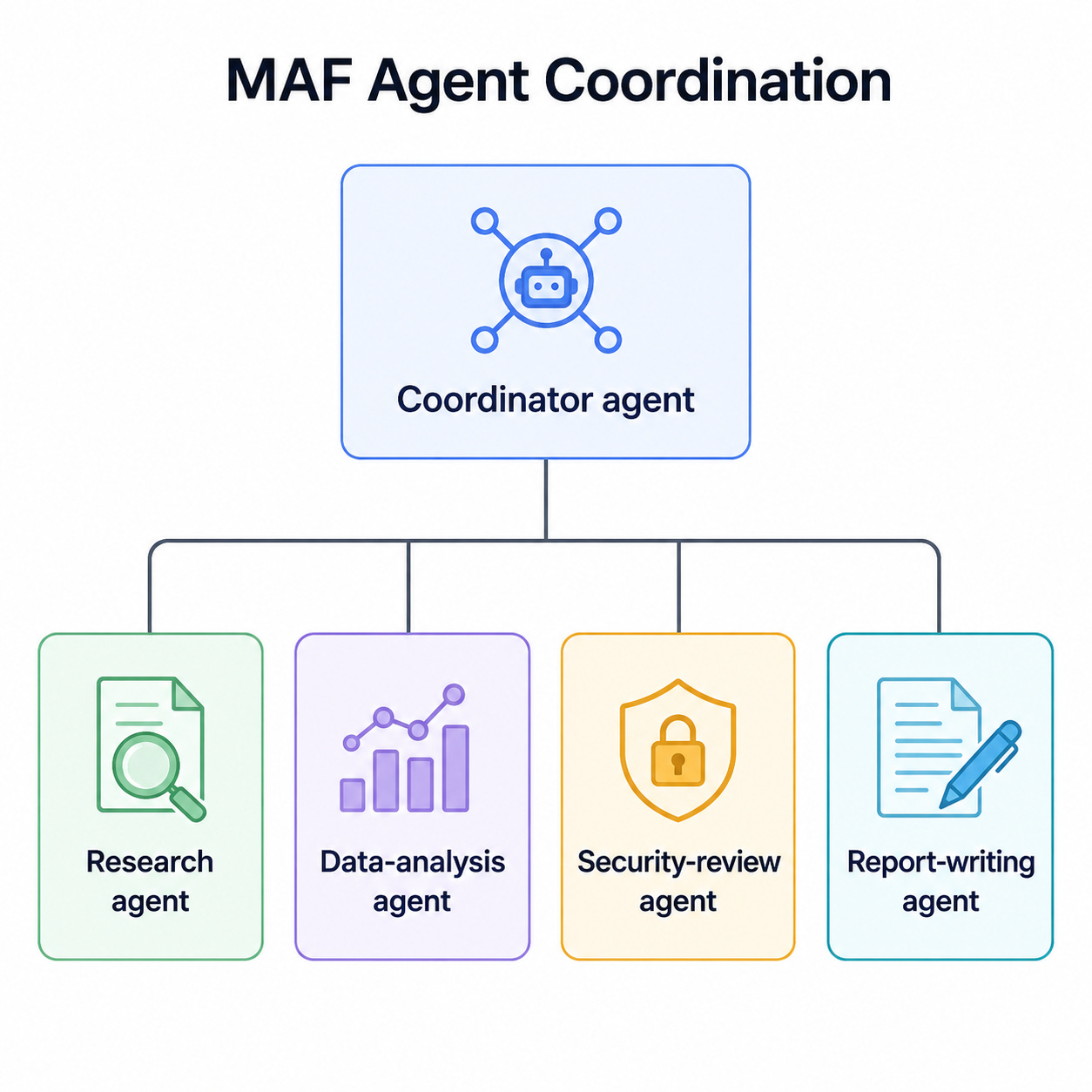
This avoids giving one agent dozens of unrelated tools and an excessively broad instruction set. Microsoft notes that tool selection and focus tend to degrade when a single agent accumulates too many responsibilities.
Use agents-as-tools when:
The agents run in the same process.
Delegation is model-directed.
Each specialist has a narrow responsibility.
A formal workflow would be unnecessarily rigid.
A2A integration
The Agent-to-Agent protocol handles communication across service and technology boundaries.
A2A supports:
Agent discovery through agent cards.
Message exchange.
Long-running tasks.
Streaming.
Cross-language and cross-framework interoperability.
A remote A2A service can be wrapped as a normal AIAgent, meaning the calling application does not need to know which framework implements it.
Use A2A when separate teams own separate agents or when agents are independently deployed services.
Use agents-as-tools when everything lives inside one application.
Workflows
An agent chooses its next action dynamically. A workflow defines its execution topology explicitly.
Agent:
    The model decides what happens next.

Workflow:
    Application code decides what happens next.
Agent Framework workflows provide:
Typed executors and message routing.
Directed graph construction.
Sequential and parallel execution.
Conditional edges
Fan-out and fan-in.
Checkpointing.
Human-in-the-loop requests.
State management.
Streaming workflow events.
Workflow observability.
Workflows exposed as agents.
Prebuilt multi-agent patterns include sequential, concurrent, handoff, group collaboration and Magentic-style orchestration.
Basic typed workflow
using Microsoft.Agents.AI.Workflows;

// Add a function that can be executed by the workflow
Func<string, string> normaliseFunction =
    input => input.Trim().ToUpperInvariant();

// Bind the function to an executor
ExecutorBinding normalise =
    normaliseFunction.BindAsExecutor(
        "NormaliseInput");

// Instantiat another executor
var reverse = new ReverseTextExecutor();

// Instantiate the workflow builder
WorkflowBuilder builder = new(normalise);

// Add two executors as the workflow steps
builder
    .AddEdge(normalise, reverse)
    .WithOutputFrom(reverse);

// Build the workflow
Workflow workflow = builder.Build();

// Run the workflow
await using Run run =
    await InProcessExecution.RunAsync(
        workflow,
        "  Hello, World!  ");

// Go through workflow events
foreach (WorkflowEvent workflowEvent
         in run.NewEvents)
{
    if (workflowEvent
        is ExecutorCompletedEvent completed)
    {
        Console.WriteLine(
            $"{completed.ExecutorId}: " +
            completed.Data);
    }
}

public sealed class ReverseTextExecutor()
    : Executor<string, string>(
        "ReverseText")
{
    public override ValueTask<string> HandleAsync(
        string message,
        IWorkflowContext context,
        CancellationToken cancellationToken =
            default)
    {
        string reversed =
            string.Concat(message.Reverse());

        return ValueTask.FromResult(reversed);
    }
}
This example is deliberately deterministic. It illustrates that not every workflow step needs an LLM.
Sequential multi-agent workflow
The following pipeline uses one agent to draft content and another to review it:
using Azure.AI.OpenAI;
using Azure.Identity;
using Microsoft.Agents.AI;
using Microsoft.Agents.AI.Workflows;
using Microsoft.Extensions.AI;

var azureClient = new AzureOpenAIClient(
    new Uri(endpoint),
    new DefaultAzureCredential());

var responsesClient =
    azureClient.GetResponsesClient();

// Instantiate a writer agent
AIAgent writer = responsesClient.AsAIAgent(
    model: deploymentName,
    name: "Writer",
    instructions:
        """
        Write one concise technical explanation.
        Do not include commentary outside the explanation.
        """);

// Instantiate a reviewer agent
AIAgent reviewer = responsesClient.AsAIAgent(
    model: deploymentName,
    name: "Reviewer",
    instructions:
        """
        Review the preceding explanation.
        Correct factual or structural weaknesses and return
        a polished final version.
        """);

// Build a sequential workflow
Workflow workflow =
    AgentWorkflowBuilder.BuildSequential(
        [writer, reviewer]);

// Create the input messgae
var inputMessages = new List<ChatMessage>
{
    new(
        ChatRole.User,
        "Explain why idempotency matters in APIs.")
};

// Execute streming chat, where the response is returned as a stream, letter-by-letter
await using StreamingRun run =
    await InProcessExecution.RunStreamingAsync(
        workflow,
        inputMessages);

// Starts the current conversational turn.
await run.TrySendMessageAsync(
    new TurnToken(emitEvents: true));

// Go through all workflow events
await foreach (
    WorkflowEvent workflowEvent
    in run.WatchStreamAsync())
{
    if (workflowEvent
        is AgentResponseUpdateEvent update)
    {
        Console.Write(update.Update.Text);
    }
    else if (workflowEvent
             is WorkflowOutputEvent output)
    {
        List<ChatMessage>? finalMessages =
            output.As<List<ChatMessage>>();

        Console.WriteLine();
        Console.WriteLine(
            finalMessages?.LastOrDefault()?.Text);

        break;
    }
}
Each participant sees the conversation generated by previous participants, allowing later agents to refine earlier work.
Workflow execution model
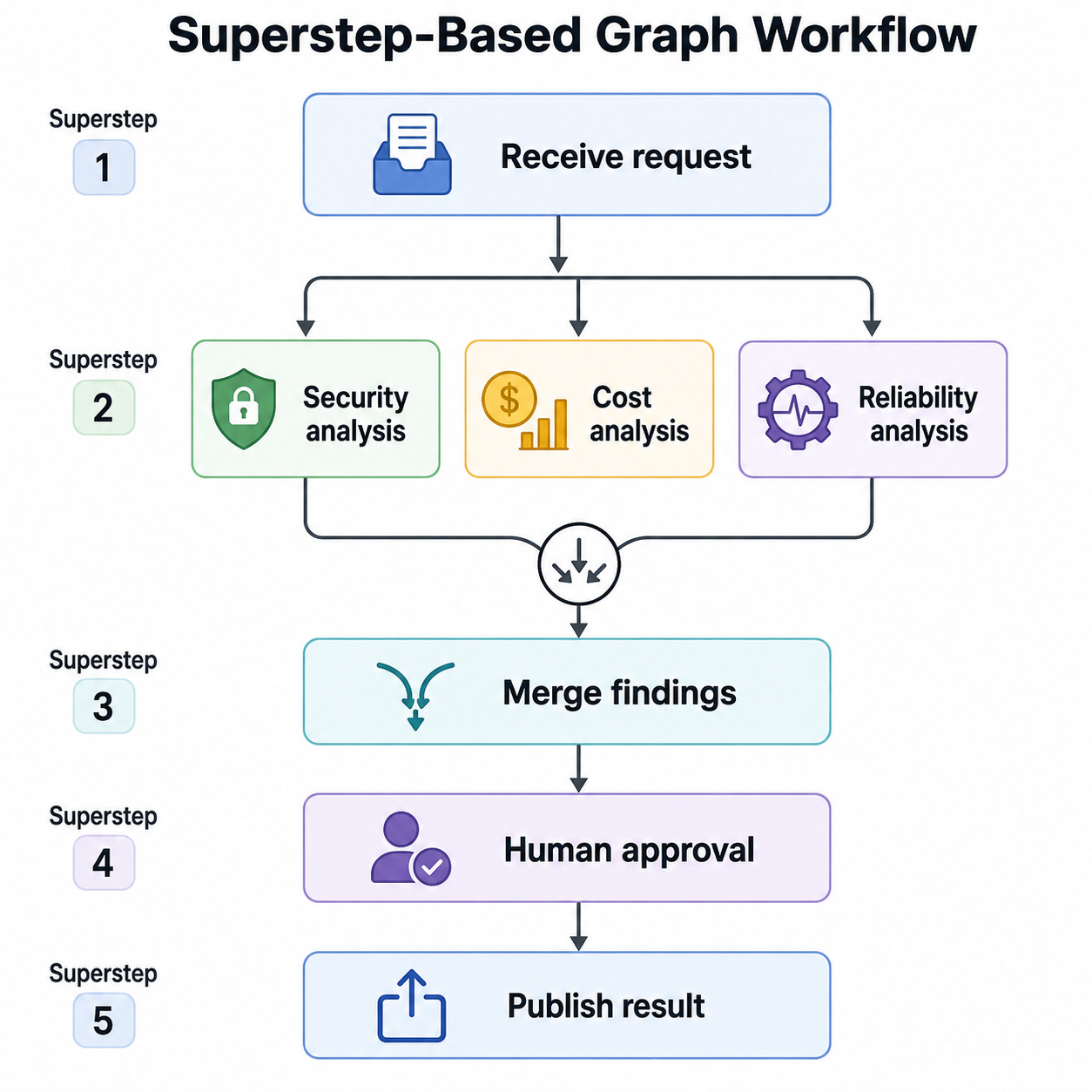
Graph workflows use a superstep-based execution model. Within each superstep, eligible executors can run concurrently; the workflow then synchronises before processing the next wave of messages. This makes fan-out/fan-in and parallel execution predictable.
For example:
Checkpointing and human-in-the-loop
Checkpointing allows a workflow to persist progress and resume after:
Process restarts.
Infrastructure failures.
Human approvals.
Long waits.
External callbacks.
Human-in-the-loop requests can pause a workflow and emit a structured request. The host then supplies a response and resumes execution.
This is significantly safer than leaving a model invocation or in-memory agent loop open while waiting hours for a person.
2.13 Agent Harness
The Agent Harness is a batteries-included runtime for long, autonomous tasks. It bundles capabilities developers would otherwise have to assemble manually:
Automatic function-invocation loop.
Planning and todo tracking.
Plan and execute modes.
Context compaction.
File memory.
File-system tools.
Persistent history after each service call.
Tool approval and “don’t ask again” rules.
OpenTelemetry.
Optional shell access.
Optional background agents.
Optional loop-until-complete behaviour.
Optional skills loaded from the file system.
It is intended for tasks such as research, coding, data analysis and general automation.
Given an IChatClient, creating a harness is minimal:
using Microsoft.Agents.AI;
using Microsoft.Extensions.AI;

// Any supported provider can supply this.
IChatClient chatClient = GetChatClient();

// Create the harness
AIAgent harness =
    chatClient.AsHarnessAgent();

// Create a session for the harness
AgentSession session =
    await harness.CreateSessionAsync();

// Run the logic in the harness
AgentResponse result = await harness.RunAsync(
    """
    Inspect the supplied project files, identify the three
    most serious reliability risks and create a remediation plan.
    """,
    session);

Console.WriteLine(result.Text);
A harness should not replace a workflow where the business process has mandatory steps. It is for autonomous exploration; a workflow is for controlled execution.
Agent Skills
Skills package reusable instructions, scripts and resources that an agent can discover and load progressively.
A skill might contain:
incident-triage/
 ├── SKILL.md
 ├── query-logs.ps1
 ├── severity-rules.md
 └── response-template.md
Progressive loading avoids placing the complete contents of every skill into every prompt. The agent first sees lightweight skill metadata and loads the detailed instructions only when relevant.
Hosting and protocol support
Agent Framework separates the internal AIAgent implementation from the protocol used to expose it.
Supported hosting and integration patterns include:
Microsoft Foundry Hosted Agents.
ASP.NET Core self-hosting.
A2A.
OpenAI-compatible Responses and Chat Completions endpoints.
AG-UI for agent web interfaces.
Durable Extension for Azure Functions or self-hosted durable processing.
MCP endpoints.
Microsoft 365 integrations.
This allows the same agent to be exposed through more than one protocol without rewriting its core implementation.
A minimal A2A host resembles:
var builder =
    WebApplication.CreateBuilder(args);

// Add A2A hosting server dependencies
builder.Services.AddA2AServer();

builder.AddAIAgent(
    "architecture-reviewer",
    instructions:
        "Review software architectures for reliability risks.",
    description:
        "A software architecture review agent.");

WebApplication app = builder.Build();

// Add the executable middleware for the A2A server hosting
app.MapA2AServer();

app.Run();
Authentication and authorisation still belong to the host. Protocol-supplied session IDs, task IDs and checkpoint IDs must be treated as untrusted and scoped to the authenticated tenant and user.
Observability
Agent Framework emits OpenTelemetry telemetry for:
Agent runs.
Model calls.
Tool invocations.
Workflow sessions.
Executors.
Edge delivery.
Message routing.
Workflow errors.
Harness activity.
Workflow telemetry includes spans such as workflow.session, workflow_invoke, executor.process and message.send.
Middleware, workflow events and OpenTelemetry serve different purposes:
Middleware enforces policy and changes behaviour.
Workflow events support runtime UI and control.
OpenTelemetry supports monitoring, tracing and diagnostics.
Wrapping up
It’s obvious from the features we discussed that Microsoft Agent Framework is way more advanced than Semantic Kernel, has more functionality, and makes it easier to add simple tools and functions. This is why, unless you have to maintain legacy code that has already been written in Semantic Kernel, you should always choose the Microsoft Agent Framework.
Next time, we will explore Microsoft Agent Framework functionality more. I will show you how to do agent evacuations with it. So stay tuned!
In the meantime, if you want to make your agents more resilient and suitable for enterprise-grade production systems, then you may want to check out my Pluralsight course on Event-driven Agentic AI.
Also, as an independent consultant, I can help you build your own agentic AI system, and as an educator, I can show your engineering team how to do it. If you are interested in either of these, let’s talk.